X Rendering Pipeline (Experimental)
The fork has two frame pipelines:
| Pipeline | Contents |
|---|---|
| Legacy | Stock UE 5.8 deferred rendering, plus the opt-in fork features and backports. Epic's own ray-traced shadows and AO stay here as Epic ships them. |
| X Rendering Pipeline (XRender) | One coupled frame: the Visibility Buffer, Volumetric Light and XPost Process with XUpscale. |
XRender is off by default. Open Control Panel > X:Renderer > Unreal Engine X Rendering Pipeline; the Visibility Buffer, Volumetric Light and XPost controls are sub-sections of that header.
This page documents the current local source. Runtime correctness and performance still require validation in the intended project; source availability alone is not a performance result.
Enable
r.RDG.AsyncCompute 1
x.VisibilityBuffer 1
x.VisibilityBuffer.AsyncCompute 1
x.VisibilityBuffer.VolumetricLighting 2
x.PostProcess.XPost 1
x.VisibilityBuffer is the master switch: DeferredShadingRenderer::Render() hands an eligible frame to X::Render::RenderVisBuffer (XVisibility/XRender.cpp). Enabling or disabling it rebuilds component render state. Turning the pipeline on in the Control Panel also switches TAA/TSR to no AA (XFSDK AA and upscaling take over) and restores Hybrid SDF GI if the pipeline had turned it off.
The former x.Experimental.VisibilityBuffer switch is replaced by x.VisibilityBuffer. Keep camera, scene and quality fixed, and let shader/PSO preparation settle before measuring.
Eligibility
A frame runs XRender only when nothing in it needs a stock-only system. Otherwise the whole frame renders on the legacy pipeline. Current whole-frame conditions:
- Nanite, Substrate, Virtual Shadow Maps, Lumen GI or reflections, TSR.
- Volumetric clouds, heterogeneous volumes, Single Layer Water, registered hair strands.
- Ray-traced sky light, ray-traced translucency, ray-traced debug overlays.
- Scene, reflection and planar-reflection captures; stereo; custom render passes.
- Debug view modes, hit proxies, wireframe and the distance-field / light-culling visualizations.
- Forward shading or a platform without D3D SM6 visibility-buffer support.
Frame layout
| Order | Work | Queue |
|---|---|---|
| 1 | Scene update, visibility, ray-tracing instance gather | CPU / graphics |
| 2 | Sky atmosphere LUTs | Async when enabled |
| 3 | PrePass, then the visibility-buffer raster with two-pass occlusion | Graphics |
| 4 | Volumetric-light preparation | Async in mode 2 |
| 5 | BasePass for routed-out meshes; visibility-buffer classification and material shading | Async in mode 1 |
| 6 | BLAS/TLAS build | Async with AsyncRayTracingBuild |
| 7 | CSM shadow depths | Graphics |
| 8 | AVBOIT extinction prepass; volume clears and integration | Integration async |
| 9 | Deferred lighting, reflections | Graphics |
| 10 | Volumetric-light integration and composite | Async integration in mode 2 |
| 11 | XPost pre-translucency preparation, AVBOIT early-out depth, translucency | Graphics |
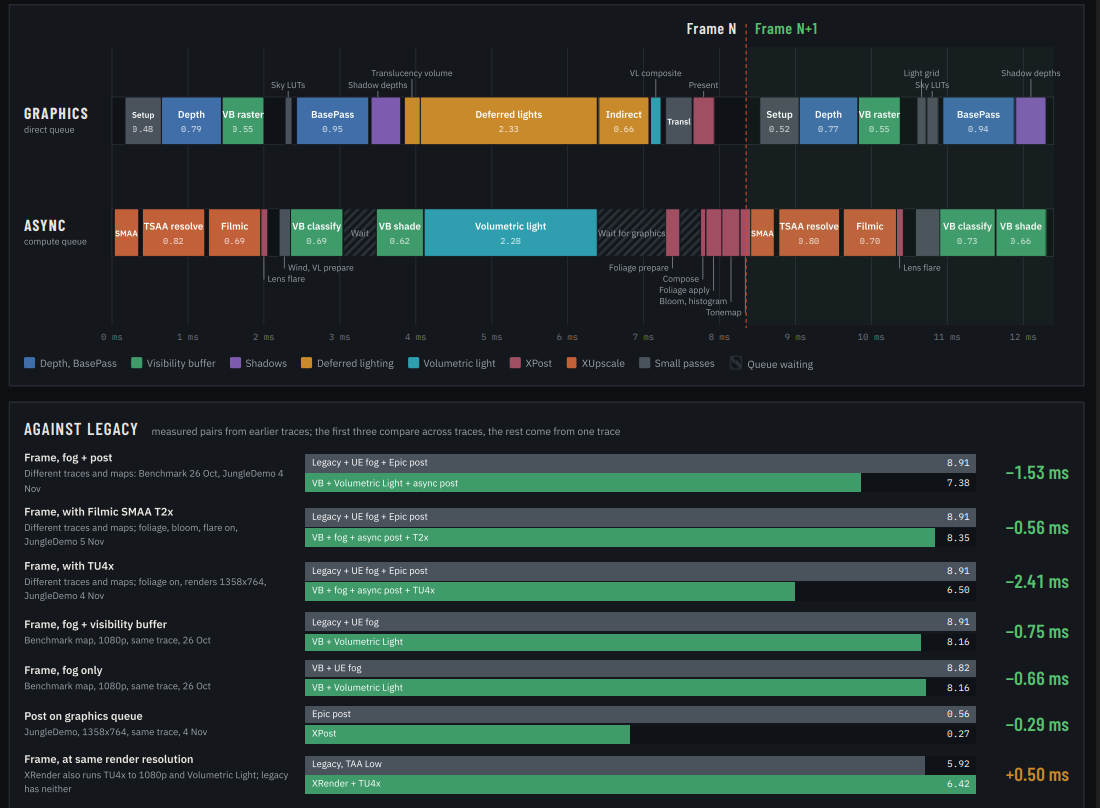
| 12 | XPost and XUpscale | Async with next-frame overlap in AsyncPostProcess 1 |
RDG async compute and hardware support still control actual queue placement. These options request scheduling, not a guaranteed speedup.
Visibility Buffer
The hybrid visibility buffer records non-Nanite foliage triangle identities, reconstructs attributes and evaluates materials in compute before deferred lighting.
Geometry and material support
Requirements include D3D SM6, GPUScene, single-sample deferred rendering and compute-writable scene/GBuffer targets. Foliage-tool instances and landscape grass qualify only when their geometry/material checks pass. Other scene geometry keeps its normal depth/BasePass path. Painting an asset with the Foliage tool can qualify it where placing the same asset as an ordinary static-mesh actor does not.
Opaque/masked materials with supported WPO are eligible. Shading models are Default Lit, Unlit, Two Sided Foliage, Cloth and Subsurface. Cloth is a shading model here, not skeletal/cloth geometry support. Unsupported material/vertex-factory combinations render through BasePass; that is per-mesh routing, not a frame fallback.
Scheduling controls
| Console variable | Default | Behavior |
|---|---|---|
x.VisibilityBuffer | 0 | Master enable |
x.VisibilityBuffer.Debug | 0 | 1 material IDs, 2 triangle IDs, 3 draw IDs, 4 GPUScene instance IDs, 5 quad utilization |
x.VisibilityBuffer.AsyncCompute | 1 | 0 graphics; 1 classification beside BasePass, then vertex/material compute after BasePass beside HZB/shadow depths |
x.VisibilityBuffer.AsyncHZB | 1 | Starts async HZB when depth is ready |
x.VisibilityBuffer.AsyncLightGrid | 1 | Builds the forward light grid beside BasePass |
x.VisibilityBuffer.AsyncRayTracingBuild | 1 | Requests async acceleration-structure/dynamic-geometry work after BasePass; requires RHI support |
x.VisibilityBuffer.EarlySubmit | 1 | Submits recorded work after depth and BasePass |
x.VisibilityBuffer.LightsReorder | 1 | Moves translucency lighting-volume injection before opaque lights |
x.VisibilityBuffer.PrecachePSOs | 1 | Read-only startup preparation of eligible foliage raster/compute material PSOs |
Volumetric Light
The alternate volumetric-lighting path renders light shafts and fog using Sky Atmosphere's Volumetric Lighting settings. Runtime ownership is X::VFX, even though XRender calls it.
Requirements
- A Sky Atmosphere component with Volumetric Lighting enabled.
- Virtual Shadow Maps disabled.
While it renders, it disables UE height fog, volumetric fog, local fog volumes and light shafts. It is a replacement route, not an addition on top of stock fog.
Queue selection
x.VisibilityBuffer.VolumetricLighting | Behavior |
|---|---|
0 | Disabled |
1 | All passes on graphics; shadow min/max and integration immediately after shadow depths |
2 | Preparation, shadow min/max and integration on async compute; composite on graphics (default) |
Quality and lighting controls
| Console variable | Purpose |
|---|---|
x.VisibilityBuffer.VolumetricLighting.Quality | 0 quarter res / 12 sun steps, 1 quarter / 16 (default), 2 half / 24, 3 half / 32 |
x.VisibilityBuffer.VolumetricLighting.MaxLocalLights | Maximum contributing local lights |
x.VisibilityBuffer.VolumetricLighting.MaxShadowedLights | Maximum shadowed local lights |
x.VisibilityBuffer.VolumetricLighting.AdaptiveSteps | Default 1; fewer directional-light steps for shorter rays |
x.VisibilityBuffer.VolumetricLighting.SkyOcclusion | Default 0; darkens covered sky-lit fog with the global distance field |
x.VisibilityBuffer.VolumetricLighting.Translucency | Default 0; integrates into the UE froxel layout for translucent materials, particles and clouds |
x.VisibilityBuffer.VolumetricLighting.Debug / .DebugScale | Diagnostic output and its display scale |
Artistic fog authoring
On Sky Atmosphere, open Volumetric Lighting. Use Shaft Intensity and Ambient Intensity to balance beams against ambient fog, and Scatter Scale to increase the camera-near medium without changing the sky. Mie Phase Preset offers Custom, Hazy, Murky and Droplets; Custom exposes phase blend and a secondary lobe. Isotropic scattering adds a separately tinted component. Fog Mode selects None, Exclude Sky or Full.
The earlier AsyncVolumetricFog, VolumetricFogInterleave and VolumetricLighting.EarlyShadows controls are retired. See Atmosphere for the fork's atmosphere defaults and Flow for simulated smoke/fog volumes.
Translucency and OIT
XRender renders translucency through the standard translucent passes. AVBOIT (adaptive voxel-based order-independent transparency, backported from UE 5.9) runs in both pipelines; XRender places its early-out depth write after volumetric light and XPost pre-translucency have sampled scene depth. See Order-Independent Transparency.
XPost Process and XUpscale
XPost is XRender's own post chain. It takes over composition, exposure, bloom and tonemapping for eligible views, exposes explicit stages for plugin effects and provides the IXUpscaler AA/upscaling interface.
Check the output log for XPost active. When a view is rejected, LogXPostProcess reports XPost inactive, using Epic post processing: followed by the reason. Setting the CVar alone does not prove the measured frame uses XPost.
Where the optimization comes from
| Area | Current implementation | Effect on work |
|---|---|---|
| Compact chain | Runs the supported composition/exposure/bloom/tonemap route and registered stages | Avoids the general stock chain's full effect orchestration |
| Early preparation | Builds the colour-grading LUT and offers upscaler/plugin preparation before translucency | Places independent preparation earlier in the frame |
| Shared bloom pyramid | Bloom and classic lens flare use one downsample pyramid; exposure can reuse its half-resolution image | Avoids duplicate source downsampling |
| Basic exposure mips | Generates four reduction mips with AddXDownsampleChainSPD | Uses the fork's SPD compute helper |
| Integrated bloom resolve | Samples and combines bloom/dirt in the tonemap shader | Avoids a separate full-resolution bloom composite |
| Direct output | Tonemap can write the family output when no separate output pass or editor/debug composite is needed | Avoids an intermediate colour target and final output pass |
| Compute scheduling | Composition, exposure, bloom and eligible tonemap/output passes use compute | Allows the async scheduler to overlap eligible work |
XPost bloom has its own filtered downsample/upsample compute passes, not a single SPD dispatch. Direct output is conditional: an upscaler, classic lens-flare composite, AfterUpscale stage, async output or editor/debug composition can add intermediate work again.
Authoring with XPost volumes
Place an XPostProcessVolume (AXPostProcessVolume). For a scene-wide baseline, enable Infinite Extent (Unbound) with Blend Weight 1. Bounded volumes use their box, Blend Radius and Blend Weight; higher priority applies later. UXPostProcessComponent supplies overrides for the actor that owns the view. UE post process volumes are ignored while XPost runs.
| Group | Controls |
|---|---|
| Exposure | Histogram, Basic or Manual; compensation; EV100 bounds; adaptation speeds; histogram percentiles |
| Bloom | Enabled, intensity, radius; dirt-mask enabled/intensity/texture |
| Classic lens flare | Enabled, intensity and threshold |
| Colour grading | LUT and LUT intensity |
The global bloom and flare switches default to 1, but the volume settings default to disabled. Bloom intensity defaults to 0.05 (clamped [0, 1]) and blends rather than adds, so it is not interchangeable with Epic's bloom intensity. The settings struct's Ray Traced Enabled/Intensity lens-flare fields are not consumed by the current code.
AA and upscaling
XPost uses the X::Render::IXUpscaler registry. An active provider supplies render fraction, temporal/velocity requirements, jitter samples, mip bias and an optional translucency mask. Without a registered provider XPost selects full resolution and no built-in AA; a performance comparison must match AA and render resolution. A third-party temporal upscaler attached the stock way makes XPost fall back.
Async overlap
x.RDG.AsyncComputeSplitFence 1
x.VisibilityBuffer.AsyncPostProcess 1
The viewport presents the previous completed post output while the current frame's post work proceeds: one frame of display latency. It requires the fork's RDG support (WITH_UEX_RDG_LIVE_PASS_CACHE), a resolvable single-view output and a UAV-writable non-sRGB target. Evaluate GPU throughput, queue synchronization and input-to-display latency together.
Coverage
| Condition | Behavior |
|---|---|
| No view state; post-processing/tonemapper show flags off | Epic post chain |
| Stereo/multiple views, captures, screenshots or relevant debug visualizations | Epic post chain |
| VRCS active, half-resolution SSR scene colour, incompatible hair composition | Epic post chain |
| Post-process materials or unregistered extensions subscribing to stock post passes | Epic post chain |
| Unsupported output/alpha, secondary resolution fraction, overscan or stock upscaler interfaces | Epic post chain |
| DOF, stock motion blur, local exposure, film grain, chromatic fringe, sharpen or texture vignette requested | x.PostProcess.XPost.EpicFallback (0 skips the effect on XPost, 1 uses Epic's chain) |
Controls
| Console variable | Default | Purpose |
|---|---|---|
x.PostProcess.XPost | 0 | Select the XPost chain for eligible views |
x.PostProcess.XPost.EpicFallback | 0 | Skip unsupported effects on XPost (0) or use Epic's chain (1) |
x.PostProcess.XPost.Bloom | 1 | Allow volume-enabled bloom/dirt |
x.PostProcess.XPost.LensFlare | 1 | Allow volume-enabled classic lens flare |
x.VisibilityBuffer.AsyncPostProcess | 0 | Request async overlap with the next frame |
Plugin integration
XPostProcessStages.h exposes ordered stages under X::Render:
| Stage | Location |
|---|---|
| BeforeTranslucency | Early preparation; scene colour is not supplied |
| AfterCompose | After initial separate-translucency composition |
| MotionBlurSlot | After the later translucency composition (an extension point, not stock motion blur) |
| BeforeExposure | Before bloom/exposure work |
| BeforeTonemap | After exposure/flare preparation, before tonemapping |
| AfterUpscale | Display-colour stage after optional upscaling and flare composition |
Register a stage with RegisterXPostProcessStage, retain its handle and unregister it with the provider's lifetime. Respect bSceneColorWritable and bSceneVelocityFinal. Use XPostProcessUpscale.h for an IXUpscaler provider; the registry stores one active upscaler.
Direction
Agreed changes that are not implemented yet:
- No stage fallbacks inside XRender. Volumetric light, XPost and translucency never hand a stage to Epic's version; the remaining stock-only conditions become one logged whole-frame eligibility check. Lumen, Nanite, Substrate, hair and Epic fog/post calls leave
XRender.cpp. - XRender owns ray tracing. Ray-traced shadows and AO become XRender compute passes with
TraceRayInline; the restored ray-traced reflections move into XRender. The legacy pipeline keeps Epic's stock ray-traced shadows and AO. - Own reflection filtering. SSR and ray-traced reflections get their own temporal pass in XRender. Today both use Epic's
AddTemporalAAPass, which is whyTAAappears instat GPUwith temporal AA off.
Profiling and release checks
Profile graphics and compute queues separately in Insights/RE:Dox. Use stat XPost for CPU counters; GPU events are labelled XPostProcess (Compose, Exposure, Bloom, LensFlare, Tonemapping, XUpscale, Present). For an A/B, keep resolution, AA provider, exposure, tonemapper and enabled effects consistent, compare legacy against synchronous XRender first, then synchronous against async.
Check representative foliage materials, masked edges/WPO, LOD changes, shadows, translucency order, supported AA/upscaling and render-state toggles in the target project. Source checked on 17 November 2026; this page does not add a benchmark result or certify shipping behavior.
References
- Philip Hammer and Dominik Lazarek (id Software), Rip & Tear: Breaking Down the Rendering of DOOM: The Dark Ages, GDC 2026. Slide 7 shows post-processing and upscaling overlapping the beginning of the next frame - the reference for XPost's async scheduling. The previous-output presentation and its one-frame latency are this fork's choices.
- Jorge Jimenez, Next Generation Post Processing in Call of Duty: Advanced Warfare, SIGGRAPH 2014. Slides 152-157 (13-fetch reduction), 161 (3x3 tent reconstruction), 164-168 (Karis weighting) and 170 (six R11G11B10 levels) map to
XPostProcessBloom.usf/XPostProcessBloom.cpp. - Nathan Hoobler (NVIDIA), Fast, Flexible, Physically-Based Volumetric Light Scattering, GDC 2016. Slides 36-39 cover medium composition and the Rayleigh, Mie-Hazy/Mie-Murky and Henyey-Greenstein terms adapted by the Hazy/Murky presets. The fork's compute ray-marching/min-max-shadow implementation differs from the talk's polygonal interval-integration renderer.
- Johannes Jendersie and Eugene d'Eon (NVIDIA), An Approximate Mie Scattering Function for Fog and Cloud Rendering, SIGGRAPH 2023 Talks. The Droplets preset uses the HG-Draine fit for a 10 micrometre droplet diameter (
GetWaterDropletPhase10Um,XVolumetricPhaseDroplets). - Michal Drobot (Activision), Adaptive Voxel-Based Order Independent Transparency, SIGGRAPH 2025 Advances in Real-Time Rendering. p.76 (async clear and integration), p.77-78 (zero-transmittance early-out depth) set the AVBOIT placement in XRender.