Unreal Engine X - Renderer

This page groups X:Renderer changes. The VFX pages cover Flow, XWindfield and Atmosphere; DevOps covers setup/build tooling and profiling workflows; Knowledge Hub covers the shared editor library. World Composition documents restored tiled landscapes, and Shipping Shading Models documents the legacy shader mask. The UE6 backports inventory keeps its existing organization.
Two larger, experimental features have their own pages: the X Rendering Pipeline (visibility buffer, volumetric light, XPost and XUpscale) and Spectral Rendering.
Renderer Configuration and Feature Availability
The primary renderer remains Win64 / D3D12 / SM6 / deferred. Source availability, project support and the selected rendering preset are separate decisions.
| System | Current behavior |
|---|---|
| Nanite | Uses normal ShouldRenderNanite() eligibility checks; newer changes do not automatically enable it for every project |
| Forward Shading | Full project-wide Forward Shading remains outside this renderer branch's supported configuration |
| Lumen | The previous unconditional-gate description is obsolete; the project preset below still disables Lumen |
RHI / RDG
This section groups Unreal Engine X changes to Direct3D 12, bindless resource handling, and the Render Dependency Graph.
D3D12 / Bindless Changes
| Change | File / Area | Description | CVar |
|---|---|---|---|
| Sampler cache hash | D3D12State.cpp | Hashes the complete zero-initialized D3D12_SAMPLER_DESC instead of only the filter value | x.D3D12.SamplerCache.FullDescriptorHash=1 |
| Bindless resource heap reserve | D3D12BindlessDescriptors.cpp | Makes the spare GPU resource heap count configurable | D3D12.Bindless.ResourceHeapSpareCount=4 |
| Descriptor-copy statistics | D3D12BindlessDescriptors.cpp | Counts copied descriptors after the existing sort/unique processing | D3D12.Bindless.HeapUpdateUniqueUploadThreshold=1024 |
| ResourceCollection residency | D3D12ResourceCollection.cpp | Rebuilds cached SRV and texture-reference residency lists after collection updates and updates linked GPU objects | x.D3D12.Bindless.ResidencyCacheHashThreshold=-1 |
| Dirty bindless stage mask | D3D12StateCache.* | Processes only shader stages that actually queued bindless residency work | x.D3D12.Bindless.UseDirtyStageMask=1 |
| Adjacent residency deduplication | D3D12StateCachePrivate.h | Skips consecutive duplicate SRV/UAV residency entries | x.D3D12.Bindless.SkipAdjacentResidencyDuplicates=1 |
| Descriptor copy coalescing | D3D12Descriptors.cpp | Combines consecutive descriptor indices into larger CopyDescriptors ranges and uses inline scratch storage for small updates | x.D3D12.Bindless.CoalesceDescriptorCopies=1 |
| Heap broadcast deduplication | D3D12BindlessDescriptors.cpp | Deduplicates large dirty-index lists before broadcasting changes to additional bindless GPU heaps | x.D3D12.Bindless.DedupBeforeHeapBroadcast=1 |
D3D12 / SM6 Configuration
The project should target DirectX 12 and Shader Model 6:
[/Script/WindowsTargetPlatform.WindowsTargetSettings]
DefaultGraphicsRHI=DefaultGraphicsRHI_DX12
+D3D12TargetedShaderFormats=PCD3D_SM6
VulkanRHI Modernization
The Vulkan path is being modernized separately from D3D12 rather than being treated as a compatibility-only backend.
For Windows, the VulkanRHI is moving to a Vulkan 1.3 minimum API contract while preserving Unreal's existing architecture where a complete redesign is unnecessary.
Selected changes have also been backported from newer Unreal Engine VulkanRHI code.
Current Vulkan Direction
The current completed work establishes the API and extension-promotion foundation.
The next major VulkanRHI targets are:
- make Synchronization2 mandatory,
- make timeline semaphores mandatory,
- standardize queue submission around
vkQueueSubmit2, - finish dynamic-rendering local-read correctness,
- make dynamic rendering unconditional,
- remove legacy render-pass/framebuffer execution paths,
- continue reducing legacy descriptor paths,
- and eventually make resource relocation safe with bindless descriptors.
Full Bindless
Enable the full bindless configuration for the SM6 shader platform with:
D3D12 SM6
[ShaderPlatformConfig PCD3D_SM6]
BindlessConfiguration=All
Vulkan SM6
[ShaderPlatformConfig SF_VULKAN_SM6]
BindlessConfiguration=All
For editor testing, the equivalent command-line configuration can be used:
-d3d12 -sm6 -BindlessAll
-vulkan -sm6 -BindlessAll
A minimal starting configuration is:
[ConsoleVariables]
x.D3D12.SamplerCache.FullDescriptorHash=1
D3D12.Bindless.ResourceHeapSpareCount=4
The resource-heap spare count can be increased when a project demonstrates additional descriptor-heap pressure.
RDG Live Pass Cache
Unreal Engine X contains an optional lightweight cache for repeated RDG live-pass traversal.
x.RDG.LivePassCache
| Value | Behavior |
|---|---|
0 | Disabled |
1 | Enabled |
Enable it with:
[ConsoleVariables]
x.RDG.LivePassCache=1
When enabled, RDG builds a compact LivePassHandles array containing the graph prologue, non-culled passes, and graph epilogue. Repeated forward and reverse live-pass traversals can then iterate this compact list instead of scanning the complete pass range and testing every pass for culling again.
This is intentionally a mild optimization. It does not cache the complete Render Dependency Graph, resources, or pass execution state.
Rendering
X Rendering Pipeline
The fork's own frame, separate from the stock UE 5.8 pipeline: a hybrid visibility buffer for non-Nanite foliage, the volumetric-light/artistic-fog route and the XPost post chain with the XUpscale AA/upscaler interface. x.VisibilityBuffer 1 enables it; a frame that needs a stock-only system renders on the legacy pipeline as a whole.
An older TROPICS benchmark measured a previous async mode 2 configuration. That mode is not the current queue contract. Results depend on the scene and configuration.
See X Rendering Pipeline for eligibility, frame layout, settings, supported materials, XPost volumes and scheduling.
Light Propagation Volumes
Unreal Engine X ports Light Propagation Volumes (LPV) from UE4 for dynamic diffuse bounce lighting. A Reflective Shadow Map (RSM) captures surfaces lit by a movable directional light. LPV injects the reflected light into a 3D grid, spreads it between neighboring cells, and adds the result to the deferred lighting pass. For example, a sunlit red wall can tint a nearby neutral surface. Direct shadows still come from Cascaded Shadow Maps or Virtual Shadow Maps.
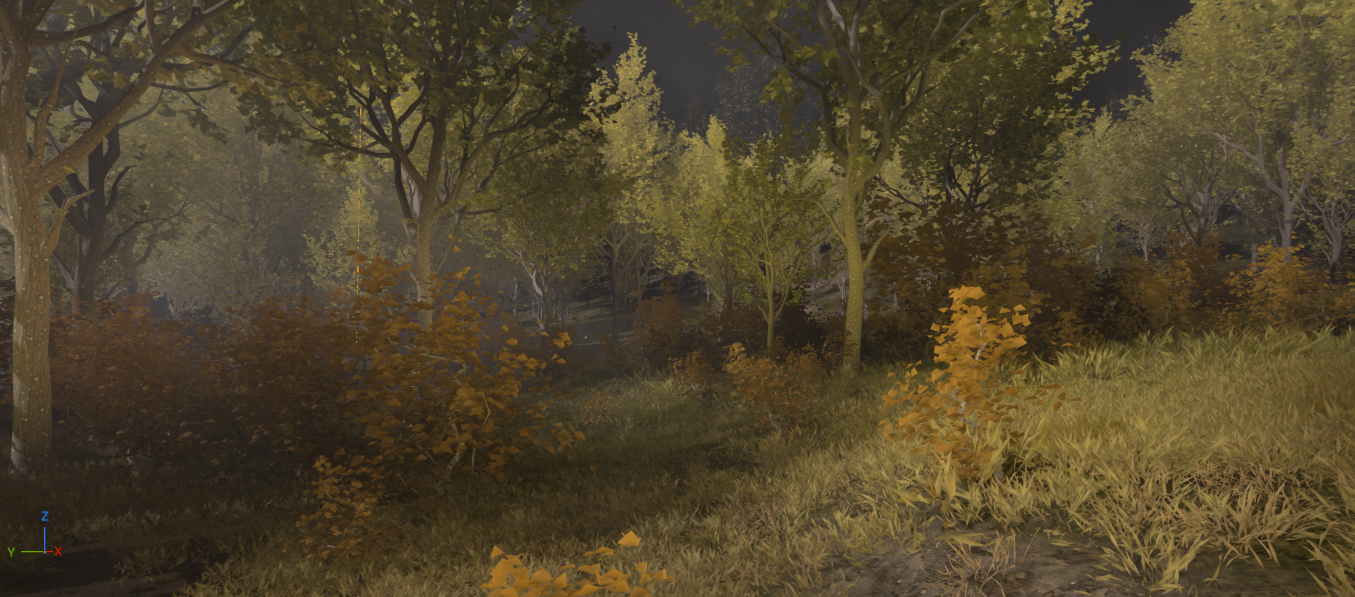
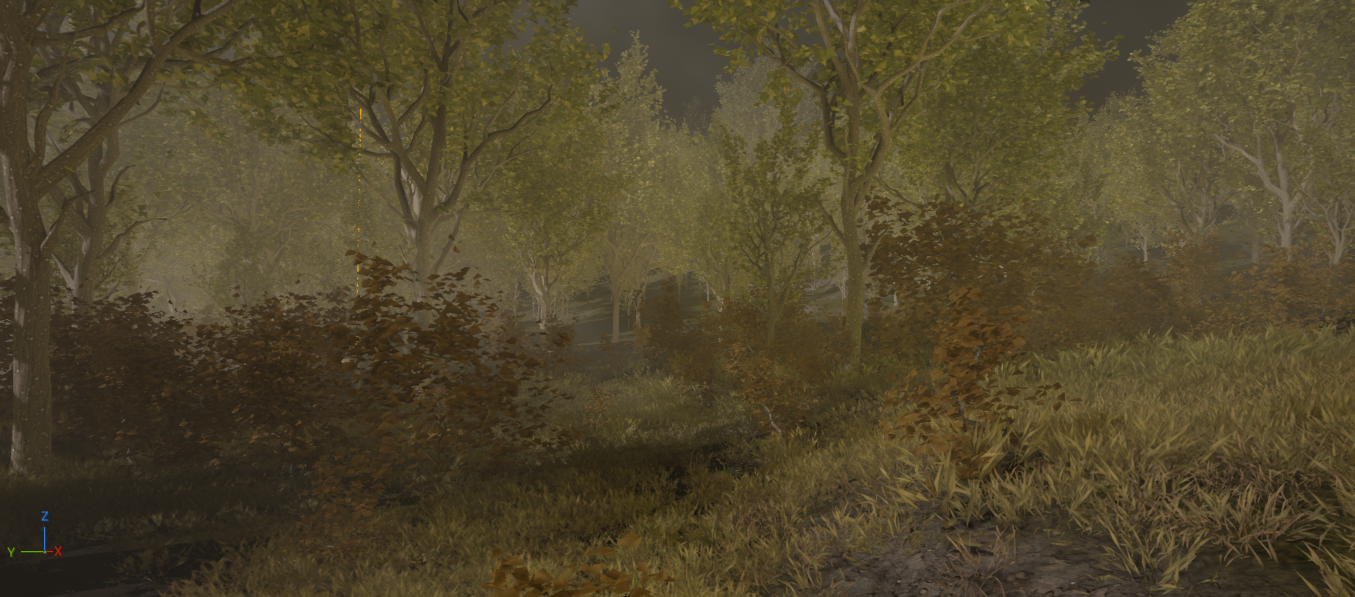
The fork extends the UE4 port in two areas.
- Camera-relative cascades. LPV supports one to three
32 × 32 × 32grids. Each cascade doubles the grid width, with finer lighting near the camera and broader coverage farther away. The renderer blends across grid boundaries and reuses cached lighting between staggered refreshes. - Distance-field occlusion. The Global Distance Field (GDF) blocks bounce between neighboring cells when it covers the full segment. LPV falls back to geometry captured in the RSM when the field is unavailable or leaves a segment uncovered. The RSM supplies reflected light in both modes.
Enable LPV
- In Project Settings → Rendering, set Dynamic Global Illumination Method to Light Propagation Volume, or set
r.DynamicGlobalIlluminationMethod 4. - Use a deferred view with GPU Scene enabled and Substrate disabled. Add a movable Directional Light with positive Indirect Lighting Intensity.
- Enable Generate Mesh Distance Fields and restart the editor to use distance-field occlusion.
- Use a Post Process Volume to override grid size, bounce intensity, propagation steps, or secondary occlusion. With XPost active, select LPV under XPost → Indirect Lighting → Method in an XPost Process Volume.
The RSM captures conventional opaque and masked geometry, including instanced foliage. It skips Nanite geometry.
| Console variable | Default | Effect |
|---|---|---|
r.LPV.Size | 5312 | Sets the default near-grid width in centimeters. Increasing it also increases cell size. |
r.LPV.NumCascades | 3 | Selects one to three grids. |
r.LPV.Intensity | -1 | Follows the view's post-process setting at -1. Set to 0 to disable the bounce. |
r.LPV.NumPropagationSteps | -1 | Follows the post-process setting at -1. Accepts an override from 0 to 8. |
r.LPV.UseGlobalDistanceField | 1 | Uses the GDF where available. Set to 0 to use RSM-based occlusion throughout. |
r.LPV.RSM.UpdateInterval | 3 | Sets the near cascade's refresh interval in frames. The interval doubles for each farther cascade. Camera or lighting changes can trigger earlier refreshes. |
Profile and visualize
In ProfileGPU, expand Light Propagation Volume and check LPV Reflective Shadow Map separately from injection, occlusion, and propagation. Only cascades that refresh issue a new RSM capture, so compare several frames when measuring capture cost or testing a lower cascade count.
In a development build, use r.LPV.Debug 1 to preview the grid and r.LPV.DebugCascade to select the near, middle, or far cascade. Use r.LPV.DebugGeometry 1 to show blocked links. Green marks GDF blockers and red marks RSM blockers.
Order-Independent Transparency (AVBOIT)
Adaptive voxel-based order-independent transparency, backported from UE 5.9 (Epic's implementation of Drobot, SIGGRAPH 2025). It runs in the legacy pipeline and in the X Rendering Pipeline.
Translucent draws first splat extinction (-log(1 - alpha)) at reduced resolution into an adaptive froxel volume. A compute pass integrates it into a transmittance LUT, and the translucent base pass then renders in any order: each pixel samples the LUT at its depth and writes weighted colour, normalization and extinction to three additive targets that a resolve composites onto scene colour. Tiles that reach zero transmittance are written into depth so hierarchical Z culls translucency behind dense smoke.
| Console variable | Default | Purpose |
|---|---|---|
r.OIT.Method | 0 | 0 sorted translucency, 1 AVBOIT, 2 MLAB sorted pixels; recreates render state on change. Replaces r.OIT.SortedPixels.Enable |
r.AVBOIT.NonNanite | 0 | Apply AVBOIT to non-Nanite translucency. Set to 1 together with r.OIT.Method 1 |
r.AVBOIT.Support | 1 | Read-only; compiles the AVBOIT shader permutations (SM6, non-mobile) |
r.AVBOIT.PixelSize | 8 | Froxel footprint in pixels |
r.AVBOIT.PhysicalSlices / .VirtualSlices | 128 / 2048 | Physical slice budget and adaptive virtual resolution |
r.AVBOIT.RGB | 1 | Coloured transmittance volume |
r.AVBOIT.EarlyOut | 1 | Zero-transmittance tile depth |
r.AVBOIT.AsyncCompute | 1 | Volume clears and integration on async compute |
r.AVBOIT.Visualize | 0 | Debug overlays 1-10 |
Controls are in Control Panel > X:Renderer > Order Independent Transparency.
Limits of the backport:
- Nanite translucency is not ported. The Nanite extinction splat needs UE 5.9 Nanite raster changes, so Nanite translucency always blends conventionally (
r.AVBOIT.Nanitehas no effect). - Content. Materials that sample scene colour (refraction-style glass, SceneColor transmission) count the background twice. Emitter sort priorities no longer apply; use camera-offset depth placement instead.
- Depth. The early-out tiles stay in scene depth after translucency, which later depth readers (AA reprojection, post) also see.
- Not replaced. View and editor elements, modulate blending and the translucency lighting volume keep their conventional paths.
Flow Volumes
Experimental NVIDIA Flow 2 integration for fire, smoke, dust, steam, fog, gas and vortex effects.
Simulation can run on the primary GPU or an optional worker GPU; rendering remains on the primary GPU. Project-wide quality settings control simulation and rendering cost.
The integration does not yet generate persistent burned masks or scorch marks on affected objects.
See Flow Volumes for setup, controls, limitations and demo-map availability.
Legacy Ray-Traced Reflections
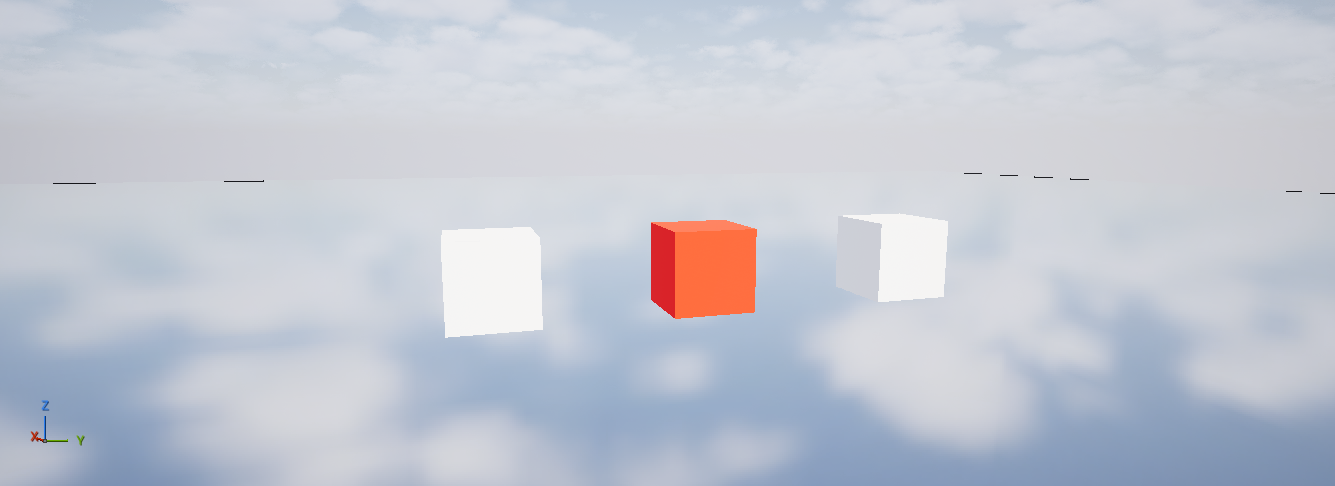
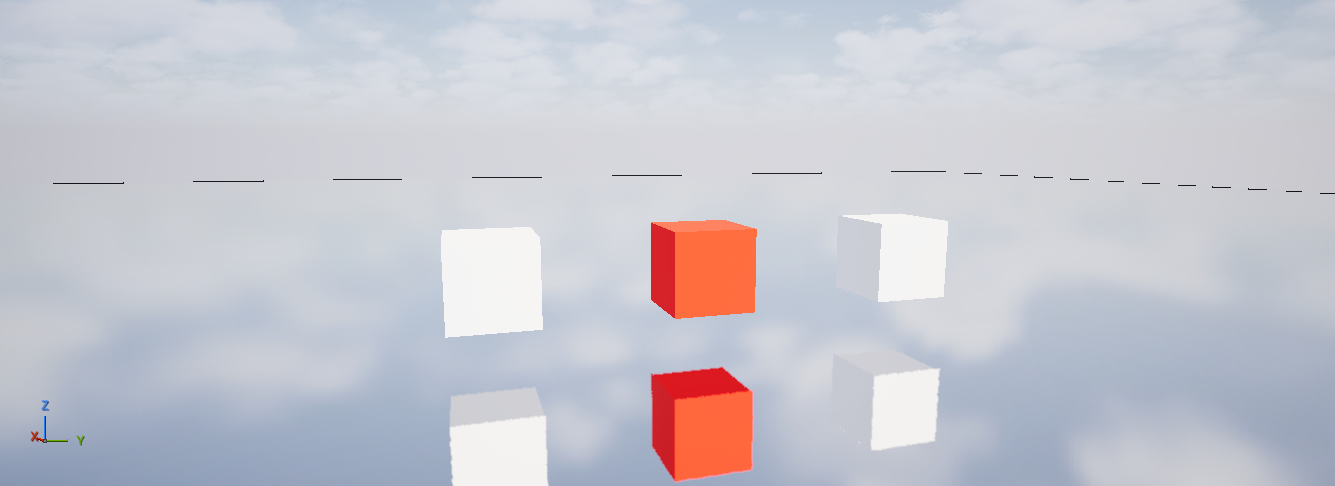
Unreal Engine X restores standalone hardware ray-traced reflections from the UE4-era feature family.
The direct implementation source is UE5.3, adapted to UE5.8's render graph and shader binding tables. The retained algorithm is brute force.
This is a separate reflection option from Lumen reflections. It requires hardware ray-tracing support, compatible project/shader settings and the full ray-tracing pipeline. The current implementation excludes Substrate.
For a project already configured for hardware ray tracing:
[ConsoleVariables]
r.ReflectionMethod=3
r.RayTracing.Reflections=-1
r.RayTracing.Reflections.SamplesPerPixel=1
r.RayTracing.Reflections.MaxBounces=1
r.RayTracing.Reflections.MaxRoughness=0.6
r.Reflections.Denoiser=1
r.RayTracing.Reflections=-1 follows the selected reflection method. 0 disables the standalone path; 1 requests it, subject to platform and view support.
Additional controls cover direct lighting, emissive/indirect contribution, reflected shadows, translucency and reflection captures.
Hardware-tessellation displacement is not represented in the traced geometry, so reflections can see the undisplaced surface.

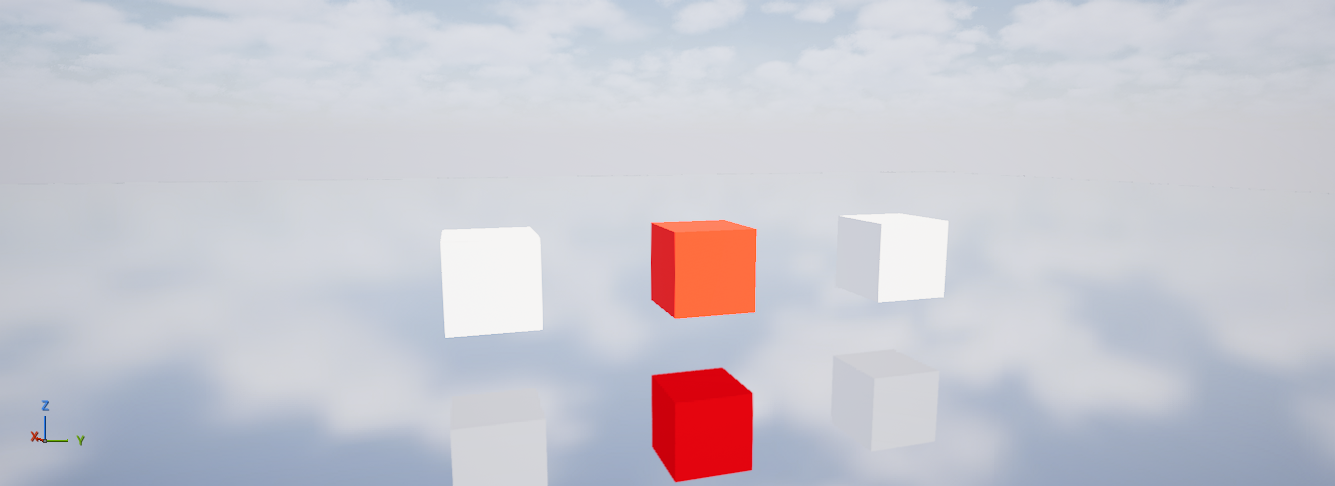
Opacity Micromaps
Unreal Engine X includes the NVIDIA Opacity MicroMap integration for alpha-tested ray-traced geometry.
Opacity micromaps classify regions of a triangle by opacity, allowing supported hardware to resolve parts of the alpha test without repeatedly executing an any-hit shader. This is particularly relevant to masked geometry such as foliage cards.
The current integration uses the D3D12/NVAPI path and requires supported NVIDIA hardware, the plugin enabled at startup, hardware ray tracing and baked micromap data.
Setup
- Enable the NVIDIA Opacity MicroMap plugin.
- Enable its hardware-opacity-micromap support setting.
- Restart the editor.
- Use Build > Build Opacity MicroMaps to generate data for compatible assets.
The main support setting is:
[ConsoleVariables]
r.RayTracing.Geometry.OpacityMicromaps.Enable=1
This is startup support configuration, not a substitute for generating micromap data.
Runtime comparison
With the plugin initialized and baked data available:
r.RayTracing.Geometry.OpacityMicromaps.RecreateRaytracedMeshes forceDisableOpacityMicromaps
recreates static ray-traced meshes without OMM attachments.
r.RayTracing.Geometry.OpacityMicromaps.RecreateRaytracedMeshes
recreates them with eligible OMM attachments.
Control Panel exposes equivalent MicroOpacity (OMM) comparison controls. They require an active world and detected hardware support.
These commands recreate ray-tracing geometry; they do not bake missing micromaps. Performance depends on geometry, materials and ray workload.
Rendering Backports
Selected newer-branch changes cover Nanite and foliage, Virtual Shadow Maps, shadow caching and renderer/RHI correctness.
See Backports and Engine Fixes for the complete recorded inventory.
Anisotropic Materials and GBufferF
The recommended configuration disables anisotropic materials:
r.AnisotropicMaterials=0
In Unreal Engine X this has an additional resource implication: GBufferF is not allocated when anisotropic materials are unsupported.
SceneTextures only creates GBufferF when:
SupportsAnisotropicMaterials()
returns true.
Projects that do not use anisotropic materials can therefore avoid allocating this additional GBuffer target.
Hardware Tessellation
Unreal Engine X restores hull/domain shader tessellation, which UE5 removed. It is ported from the UE 4.21 NVIDIA GameWorks branch and drives UE5's material Displacement input on non-Nanite geometry.
- Direct3D 12, Shader Model 6 (
PCD3D_SM6). Other RHIs compile without hull/domain shaders. - Nanite disabled for the project (
r.Nanite.ProjectEnabled=0). - Opaque or masked materials on static meshes, instanced static meshes or landscape.
Material setup
The settings are in the material's Nanite category, shared with UE5's Nanite displacement. Material instances can override Displacement Scaling and Displacement Fade.
| Setting | Description |
|---|---|
| Enable Tessellation | Turns hardware tessellation on for the material |
| Displacement | Height in [0, 1]. The surface moves (saturate(D) - Center) * Magnitude world units along the normal, as with Nanite |
| Displacement Scaling | Magnitude (total range in world units) and Center (the height that stays in place) |
| Tessellation Mode | Flat subdivides the triangle; PN Triangles also rounds it with curved patches |
| Enable Crack Free Displacement | Welds displacement across hard edges and UV seams |
| Displacement Fade | Fades displacement out below a pixel size on screen; fully faded patches are not subdivided |
| Tessellation Multiplier node | Custom output node that scales subdivision per vertex (0 none, above 1 denser). Below 1 it also fades displacement. Drive it with distance or world position, not UVs |
Crack-free displacement and PN Triangles on meshes with hard edges or UV seams need Build Adjacency Buffer (Static Mesh Editor > LOD > Build Settings). It is off by default and costs 4x the index buffer. Landscape needs none.
Console variables
| Console variable | Default | Description |
|---|---|---|
x.HWTessellation | 1 | 0 disables subdivision; displacement is still applied at the original vertices |
x.HWTessellation.MaxFactor | 15 | Maximum tessellation factor per edge, 1-64 |
x.HWTessellation.PixelsPerEdge | 10 | Target on-screen edge length of generated triangles; lower is denser |
x.HWTessellation.Shadow.EdgeLength | 2 | Target world-space edge length (cm) in shadow passes |
x.HWTessellation.Wireframe | 0 | Draws tessellated meshes as wireframe in the base pass |
x.HWTessellation.DrawEvents | 0 | One GPU event per tessellated draw in ProfileGPU and Insights |
Skeletal adjacency plumbing is available, but the static-mesh checkbox above does not establish skeletal rendering support. See the skeletal limitation below.
Control Panel exposes them under X:Renderer > Hardware Tessellation. stat HWTessellation shows tessellated draws and patch counts.
Coverage
- Tessellated: base pass, depth prepass, custom depth, velocity and every shadow type. Shadows subdivide by world edge length rather than by camera, so cached shadows stay valid.
- Landscape: components whose material tessellates opt out of landscape GPU culling.
- Skeletal meshes: adjacency integration is present in skeletal render data, streaming and scene-proxy paths, but the checked GPU-skin and passthrough vertex factories still do not advertise
SupportsHWTessellation. Skeletal crack-free tessellation is therefore not release-ready in this source snapshot. Complete the vertex-factory/shader boundary and validate deformation, LOD transitions and shadow passes before claiming support. - Other unsupported paths: spline meshes and particles.
- Not displaced: ray tracing, distance fields and Lumen see the undisplaced mesh.
Standalone reflection reference
See Legacy Ray-Traced Reflections above for the restored path and requirements.
AMD FidelityFX Single Pass Downsampler (SPD)
Unreal Engine X integrates AMD FidelityFX Single Pass Downsampler (SPD) into Unreal Engine's post-processing texture downsample chain.
The standard low-quality downsample chain generates each lower-resolution stage as a separate dependent pass. SPD replaces the five-stage chain used by the current renderer path with a single compute dispatch when the compatible path is selected.
Enable SPD with:
[ConsoleVariables]
r.Downsample.EnableSPD=1
r.PostProcessing.DownsampleChainQuality=0
The current SPD integration is intentionally enabled only for Unreal Engine's Low downsample quality:
r.PostProcessing.DownsampleChainQuality=0
The existing High quality path is preserved because its repeated filtered downsample is not equivalent to SPD's reduction filter. Setting the chain quality to High therefore falls back to Unreal Engine's original sequential implementation rather than silently changing the image.
The shared downsample chain is used by several post-processing systems, so SPD is not limited to bloom. Depending on the active renderer configuration, it can reduce downsample work used by:
-
Gaussian Bloom,
-
Lens Flares,
-
Local Exposure blurred luminance,
-
and Basic Eye Adaptation.
For chains that do not require luminance data in alpha, the normal five dependent downsample stages become one SPD compute dispatch:
5 sequential downsample passes
->
1 SPD compute dispatch (5 generated levels)
Basic Eye Adaptation is handled differently because Unreal Engine writes scaled log luminance into the alpha channel after the first downsample and expects that value to propagate through the remaining levels. Its SPD path therefore preserves the engine's luminance setup:
Downsample
-> BasicEyeAdaptationSetup
-> SPD compute dispatch (4 remaining levels)
This avoids changing Unreal Engine's exposure calculation while still removing four dependent downsample passes.
Example GPU Capture
In a simple editor-resolution test scene, the scene downsample chain changed from:
Before: 5 passes / ~0.04 ms
SPD:    1 pass  / ~0.01 ms
That capture represents roughly a 75% reduction in GPU time for this specific downsample workload. It should not be treated as a fixed percentage for every GPU, resolution, or scene. The absolute cost of the downsample chain grows with resolution, so the value of eliminating dependent dispatches and synchronization generally becomes more relevant as the workload increases.
The current integration targets the existing five generated stages used by Unreal Engine's post-processing downsample chains. AMD SPD itself is designed as a general single-pass mip-generation technique and can support larger mip chains, but unrelated engine mip-generation systems are not automatically redirected through this path.
FidelityFX GPU Radix Sort
Unreal Engine X also includes an alternative Radix Sort backend for the FidelityFX GPU sorting path. The configuration keeps FidelityFX Parallel Sort selected while enabling the fork's radix backend, providing a specialized route for GPU workloads that sort large key/value buffers.
[ConsoleVariables]
fx.GPUSort.Algorithm=0
x.GPUSort.RadixBackend=1
The optimization is intended for GPU workloads where sorting cost becomes significant. Its benefit depends on the number of elements being sorted, the workload using GPU sort, and the target GPU, so performance should be validated with a representative capture rather than treated as a fixed improvement.
Cascaded Shadow Maps
Unreal Engine X keeps classic cascaded shadow maps (Virtual Shadow Maps are disabled) and improves them. Most settings are in Control Panel under X:Renderer > CSM.
| Change | Console variable | Description |
|---|---|---|
| CSM shadow-depth reuse (UE6 backport) | x.Shadow.CSMShadowDepthReuse=1, x.Shadow.CSMShadowDepthReuse.Interval=2 | Reuses unchanged cascade depth beyond cascade 0 when no dynamic casters are present |
| Static CSM caching | r.Shadow.CSMCaching=1 | Exposes the existing static cache to quality presets; dynamic casters still render every frame |
| Static caster LOD scale | x.Shadow.CSM.StaticCasterLODScale=0.5 | Coarser LODs for distant static casters per cascade (1, 1.5, 2, 2.5); animated casters and cascade 0 unchanged |
| Caster significance | x.Shadow.CSM.CasterSignificance=1, .MaxScreenPixels=32, .MaxShadowTexels=2 | Culls small static casters beyond cascade 0 |
| Simplified CSM path | x.Shadow.LegacyCSM=0 | 1 selects the simplified legacy directional projection (4-tap hardware comparison PCF); 0 is stock UE5 |
| PCSS+ directional filtering | r.Shadow.FilterMethod=1, x.Shadow.PCSSPlus=1 | Uses the PCSS+ directional shadow filter. Set x.Shadow.PCSSPlus=0 to use the existing UE PCSS path |
| DPCF directional filtering | r.Shadow.FilterMethod=3 | Dilated PCF with contact hardening from Call of Duty: Black Ops Cold War. Directional light only; other lights use uniform PCF |
PCSS+ settings
| Console variable | Default | Description |
|---|---|---|
x.Shadow.PCSSPlus | 1 | 0 uses the existing UE PCSS filter. 1 enables PCSS+ with fixed spatial sampling. |
x.Shadow.PCSSPlus.RadiusCm | 0.0 | Maximum filter radius in world centimeters. Independent of LightSourceAngle. |
x.Shadow.PCSSPlus.ThresholdCm | 1000.0 | World-space blocker separation corresponding to the nominal maximum filter radius. |
x.Shadow.PCSSPlus.ClampCm | 0.0 | Clamps the world-space blocker separation used for penumbra calculation. |
x.Shadow.PCSSPlus.MinSizePercent | 100.0 | Minimum filter radius as a percentage of the maximum radius. |
x.Shadow.PCSSPlus.WeightThresholdPercent | 100.0 | Weight interpolation threshold in percent. |
x.Shadow.PCSSPlus.ReceiverBiasCm | 0.0 | Adds receiver comparison bias in centimeters without changing the receiver distance used for penumbra size. |
x.Shadow.PCSSPlus.ReceiverPlaneBias | 0 | Enables clamped receiver-plane depth correction. 0 disables it, 1 enables it. |
x.Shadow.PCSSPlus.Adaptive | 1 | 0 always uses 64 filter taps. 1 selects between 32 and 64 taps based on estimate agreement. |
x.Shadow.PCSSPlus.BilinearPCF | 0 | Enables spatial bilinear filtering of depth comparisons to reduce blocky sub-texel edges. Blocker search remains point sampled. |
x.Shadow.PCSSPlus.MinRadiusTexels | 3.08 | Minimum filter radius in shadow texels. 0 preserves the world-space radius. Larger values blur fine shadows. |
Directional shadow filters
r.Shadow.FilterMethod | x.Shadow.PCSSPlus | Directional filter |
|---|---|---|
0 | - | Uniform PCF |
1 | 0 | Unreal Engine PCSS |
1 | 1 (default) | PCSS+ |
1 | 2 | PCSS Cone (HDRP-style cone blocker search) |
3 | - | DPCF; spot and point lights use uniform PCF |
Settings are in Control Panel under X:Renderer > CSM > Filtering.
DPCF
DPCF (dilated percentage-closer filtering) comes from Treyarch's Shadows of Cold War (GDC 2021). One set of PCF samples gives both the regular PCF result and a hardened version of it on an S-curve: above 50% occlusion it shades lighter, below it stays shadowed. The filter blends toward the hardened curve when the blocker is close to the receiver. Contact shadows sharpen without a blocker-search pass or extra texture reads, and the curve also reduces shadow acne. The shader follows Google Filament's implementation: 12 rotated disk taps.
r.Shadow.FilterMethod=3
| Console variable | Default | Description |
|---|---|---|
x.Shadow.DPCF.RadiusCm | 3.0 | Filter radius in world centimeters (12 sample locations). |
x.Shadow.DPCF.MinRadiusTexels | 1.5 | Minimum filter radius in shadow texels, 0-16. |
x.Shadow.DPCF.PenumbraRatioScale | 1.0 | Scales the blocker-to-receiver ratio that blends from the hardened curve back to regular PCF. 0 always uses the hardened curve; larger values approach regular PCF. |
x.Shadow.DPCF.ReceiverPlaneBias | 1 | Receiver-plane depth correction for the comparisons. |
x.Shadow.DPCF.BilinearPCF | 1 | 1: each tap is a 4-depth gather with bilinear weights (smoother edges, still one pass). 0: Filament's 12 point comparisons. |
Sky Atmosphere
Atmosphere defaults and volumetric lighting/fog belong to X:VFX. See Sky Atmosphere and Volumetric Light in the X Rendering Pipeline.
GT7 Tonemapper
Unreal Engine 5.8 added a selectable LUT tonemapping pass (Filmic and ACES), which made integrating Polyphony Digital's GT7 tonemapper straightforward. Select it with:
r.LUT.TonemappingMethod=2
| Value | Tonemapper |
|---|---|
-1 | Post Process Settings |
0 | Filmic |
1 | Standard ACES |
2 | GT7 |
GT7 uses UE's 203-nit paper white for HDR output. With spectral lighting on, x.Spectra.GamutClamp also maps GT7's input and
output at constant luminance.
Shaders
Shipping Shading Models
The legacy non-mobile renderer exposes Supported Shading Models in Project Settings > Rendering > Shader Permutation Reduction. Select the models used by the project before building its shipping shaders.
The setting is stored as SupportedShadingModels and maps to x.ShadingModelsMask. It is a startup/compile-time shader configuration: restart the editor and rebuild/cook shaders after changing it. It is not a live runtime material switch.
Disabled legacy models render as Default Lit, and their lighting shader branches are stripped through SHADING_MODELS_MASK. Unlit, Default Lit, Single Layer Water, Thin Translucent and Substrate are always enabled by the implementation. Keep every model required by shipped materials and fallback assets.
Mobile keeps its existing r.Mobile.ShadingModelsMask path. This feature does not turn Substrate into the legacy renderer or remove its separate configuration. Source checked on 5 November 2026 in RendererSettings.h, RenderUtils.cpp, ShaderCompiler.cpp and ShadingCommon.ush.
Bayer LOD Transition
Unreal Engine X adds ordered Bayer patterns as alternatives to Epic's standard pseudo-random screen-space dithering for LOD transitions.
The material must first have Dithered LOD Transition enabled in the Material Editor.
The active pattern is selected through:
x.LODDitherMode
The CVar is defined as:
static TAutoConsoleVariable<int32> CVarLODDitherMode(
    TEXT("x.LODDitherMode"),
    0,
    TEXT("Specifies the spatial pattern used for dithered LOD transitions.\n")
    TEXT(" 0: Epic pseudo-random screen-space dither.\n")
    TEXT(" 1: Ordered Bayer 2x2.\n")
    TEXT(" 2: Ordered Bayer 4x4."),
    ECVF_RenderThreadSafe);
| Value | Pattern |
|---|---|
0 | Epic pseudo-random screen-space dither |
1 | Ordered Bayer 2Г—2 |
2 | Ordered Bayer 4Г—4 |
x.LODDitherMode controls the spatial dithering pattern. It does not enable LOD dithering by itself.
Enable Dithered LOD Transition on the material before using the CVar.
Epic Screen-Space Dither
x.LODDitherMode=0
Bayer 2Г—2
x.LODDitherMode=1
Bayer 4Г—4
x.LODDitherMode=2
Hashed Alpha Testing
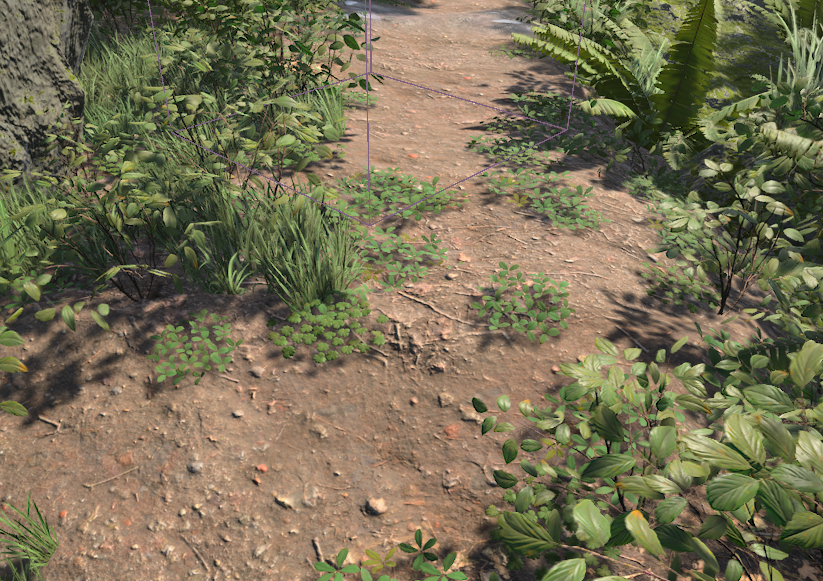
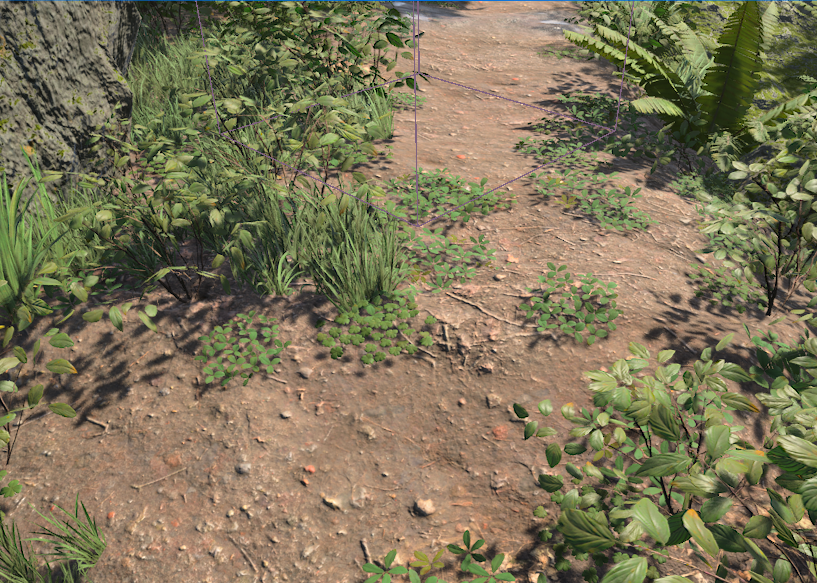
Unreal Engine X introduces per-material Hashed Alpha Testing for Masked materials, replacing the fixed alpha cutoff with a hashed threshold for improved coverage of fine geometry and foliage.
Enable Hashed Alpha Test under Advanced in the Material Editor.
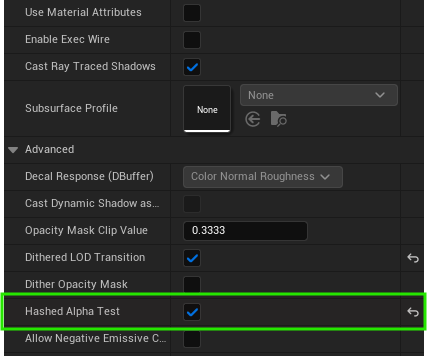
Hashed Alpha Test material setting
Global Toggle
The feature can be enabled or disabled at runtime without changing individual materials:
x.Material.HashedAlphaTesting=1
| Value | Behavior |
|---|---|
0 | Standard masked alpha clipping |
1 (default) | Hashed alpha testing on opted-in materials |
The toggle affects both the main rendering and shadow passes.
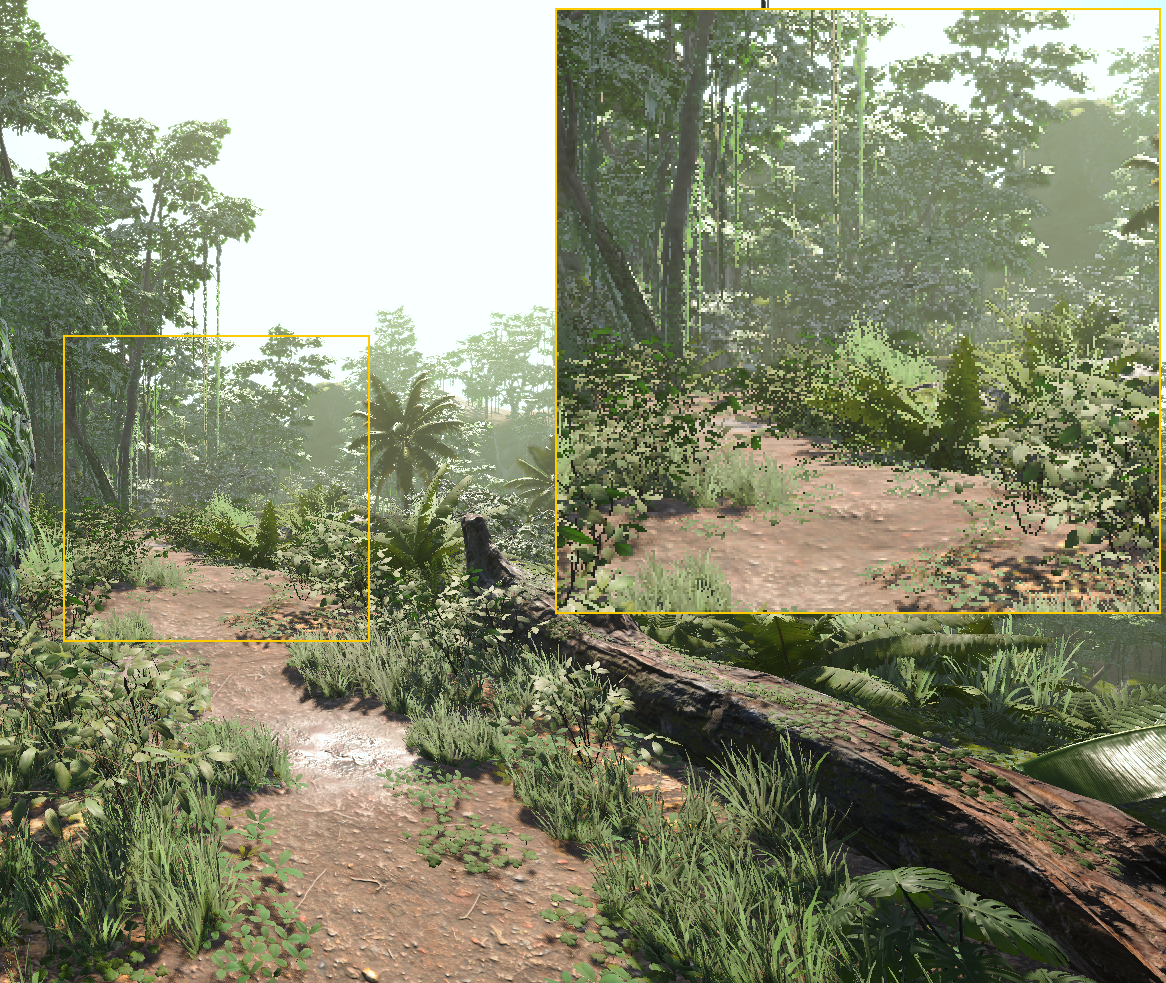
Hashed Alpha — ON
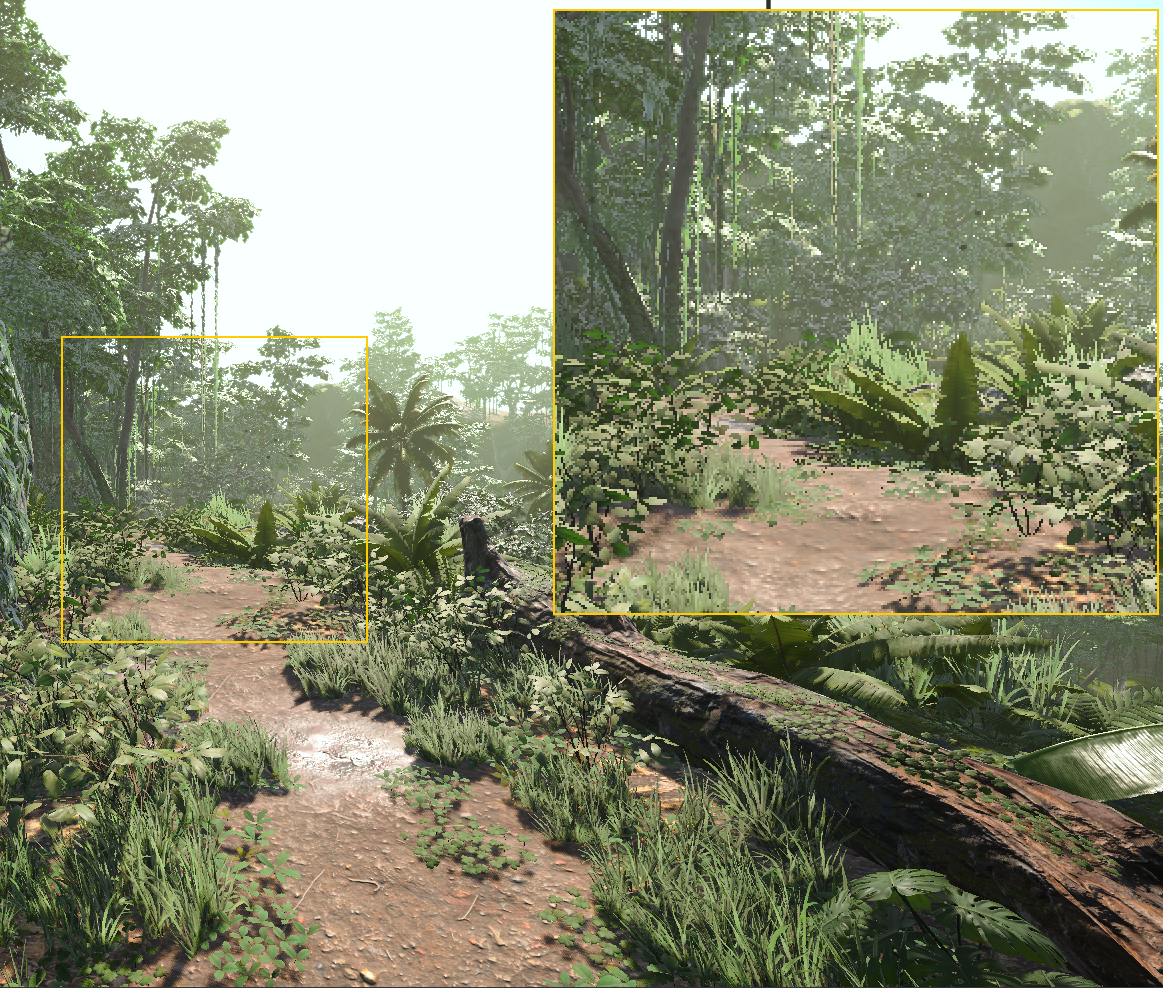
Hashed Alpha — OFF
Hashed Alpha Testing works best with temporal anti-aliasing (TAA/TSR). Spatial-only methods such as FXAA or SMAA may produce noticeable noise. Set x.Material.HashedAlphaTesting=0 when using spatial AA.
Based on Hashed Alpha Testing — NVIDIA Research (2017).
Custom Upscaler
The current temporal route requires:
r.AntiAliasingMethod=2
r.TemporalAA.Upsampling=1
r.VelocityOutputPass=1
Using:
r.AntiAliasingMethod=0
prevents Unreal Engine's temporal-accumulation check in SceneVisibility.cpp and therefore prevents the normal engine temporal jitter sequence.
The custom upscaler must be installed for every intended view family. If it is not installed, AAM_TemporalAA can fall back to Epic TAA.
The fork-specific:
x.AA.TwoSamplePattern
only changes the pattern when:
r.TemporalAASamples=2
It does not enable temporal jitter by itself.
World Composition and Tiled Landscapes
The fork restores World Composition authoring and tiled-landscape import discovery for projects using streamed landscape tiles. This is an optional legacy workflow alongside World Partition; it does not convert existing World Partition maps automatically.
Import tiled landscapes
- Create and save a conventional level suitable for World Composition.
- Open the Levels/World Browser hierarchy menu and choose Import Tiled Landscape....
- If World Composition is disabled, accept the prompt to enable it before the tiled importer opens.
- Select matching heightmap/weightmap tiles, review coordinates, scale and import settings, then import.
The entry is discoverable before World Composition is enabled. The source tooltip requires a saved level without manually added sublevels; resolve that setup before importing. Preserve consistent tile naming, dimensions and shared edges in the source data.
Houdini integration
The engine-local XDocs/WorldComposition/HoudiniIntegration package documents a separate restoration for the locally adapted Houdini plugin. Its patch targets H21.0.671/UE5.8 and includes compile-only evidence. It is not an engine plugin update automatically installed by enabling World Composition. Follow the matching plugin documentation and validate tile creation, reimport, streaming and save/reopen in the editor.
Source checked on 5 November 2026 in WorldBrowser/Private/SWorldHierarchy.cpp and the local integration notes. Compile-only evidence does not establish successful editor acceptance.
UI
ImGui Editor UI and XConsole
The shared Control Panel editor/game host, plugin-tab API and optional TBImGui editor presentation are documented under DevOps.
UnrealBuildTool
Plugin Module Exclusion
Build tooling belongs to X:DevOps. See UnrealBuildTool and plugin module exclusion.
Configuration
See DevOps.
Conditional exclusions
See DevOps.
Dependencies and runtime loading
See DevOps.
Third-Party
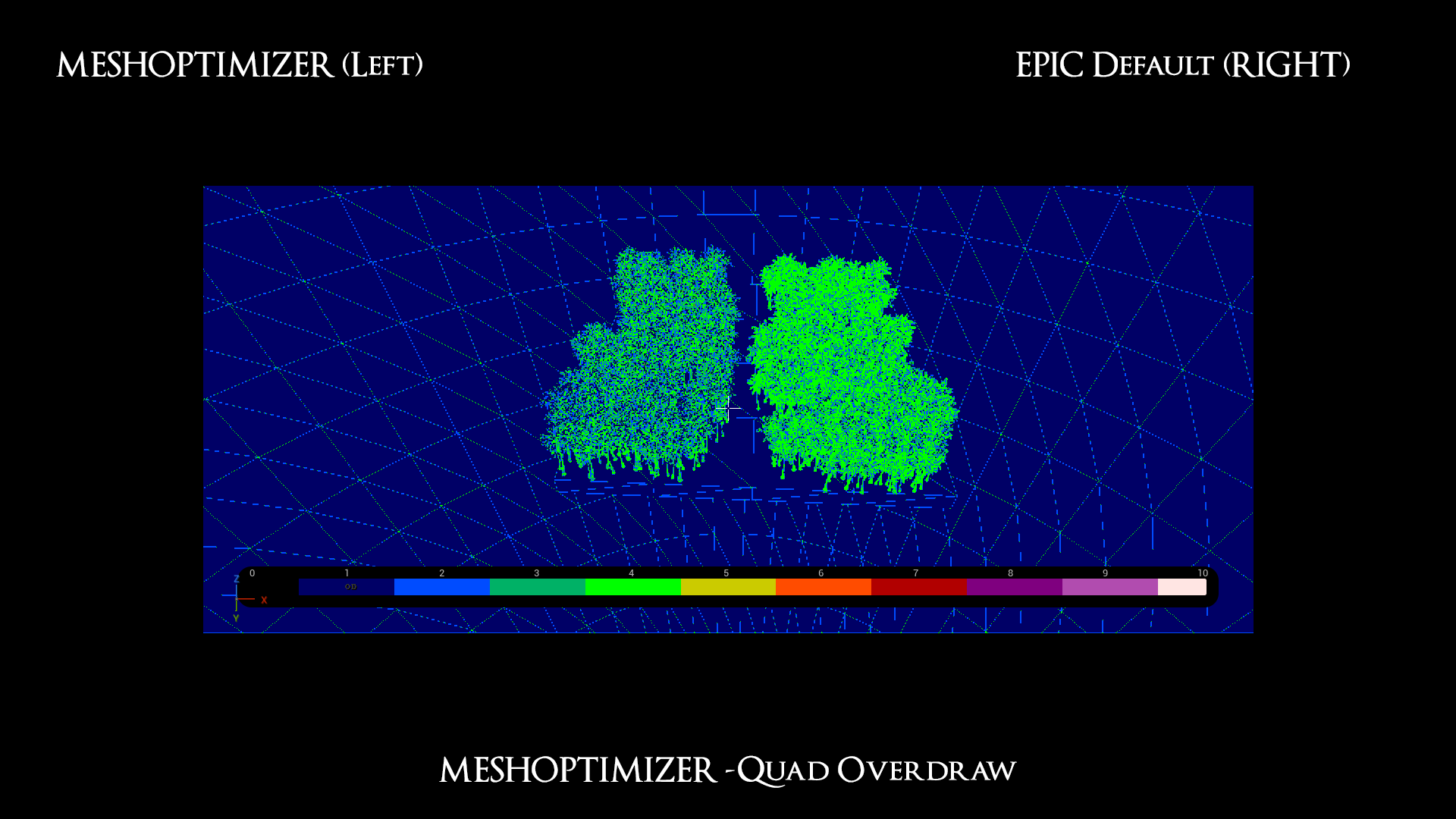
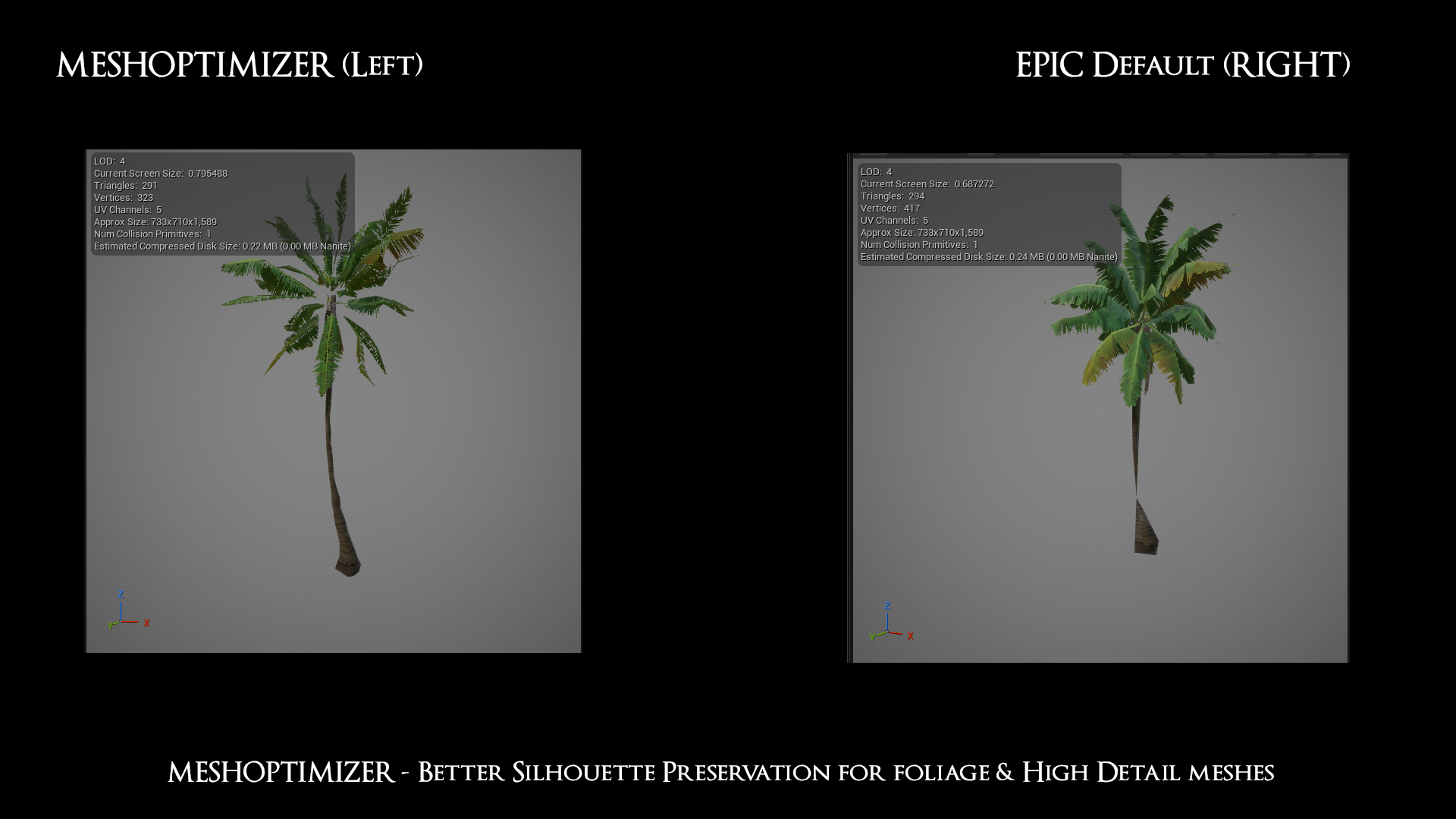
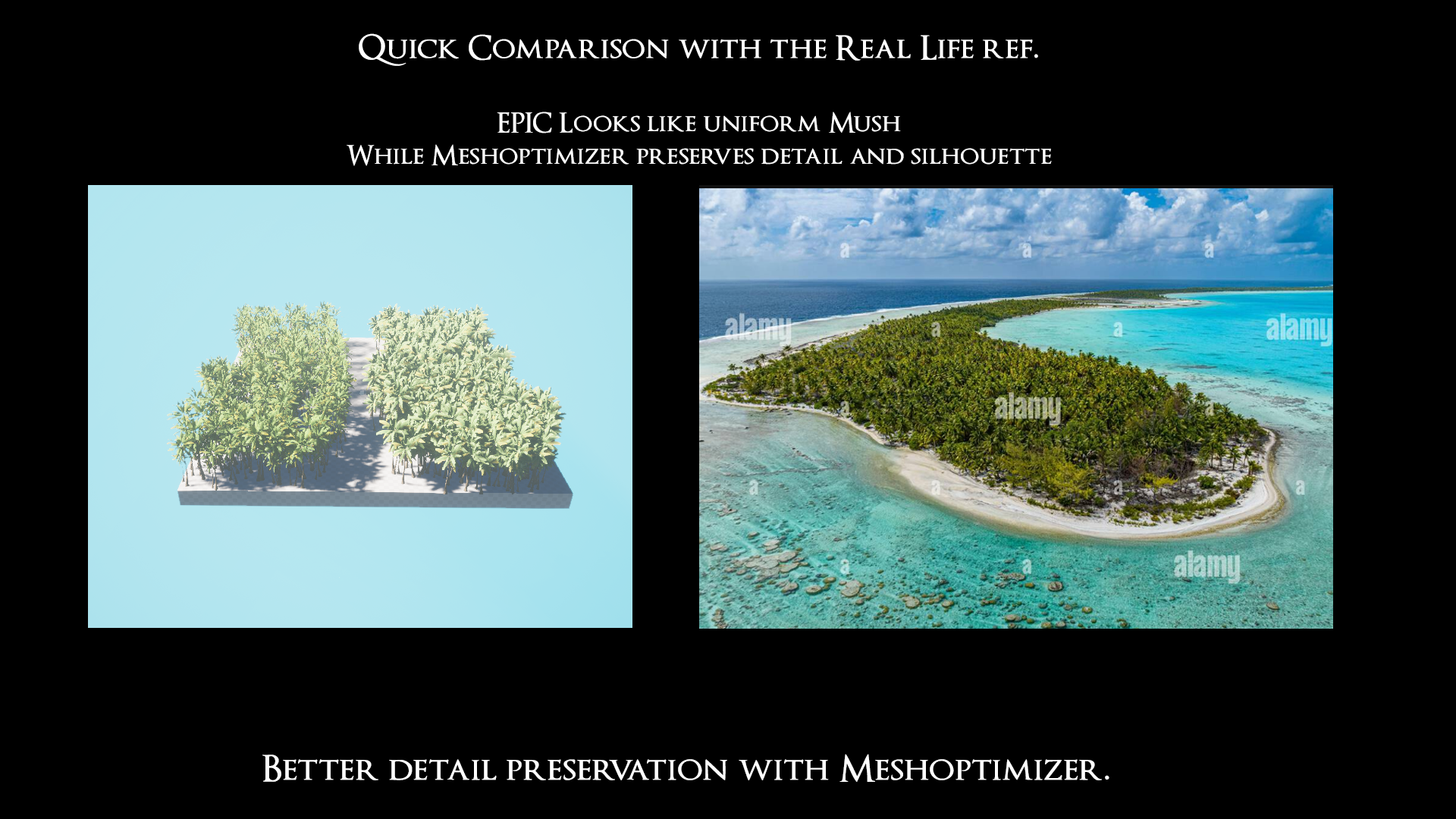
meshoptimizer LOD Reduction
meshoptimizer is integrated into Unreal Engine X as an alternative LOD reducer.
This provides an additional mesh-simplification path outside Unreal Engine's standard reduction stack.
Related controls include:
| Console variable | Default | Description |
|---|---|---|
x.MeshOptimizer.LOD | 0 | Uses meshoptimizer for static-mesh LOD reduction |
x.MeshOptimizer.Overdraw | 0 | meshoptimizer overdraw optimization during static mesh build |
x.MeshOptimizer.CoarseLODStart | 2 | First LOD using stronger reduction with protected permissive simplification (-1 disables) |
x.MeshOptimizer.CoarseLODRatio | 0.85 | Extra triangle target multiplier per coarse LOD (0.5-1) |
x.MeshOptimizer.AutoLODProjectedError | 0 | 1 computes LOD screen sizes from a projected pixel-error approximation (1920x1080 reference) instead of UE's deviation-to-distance estimate |
Rebuild meshes after changing a reduction setting.
Examples
Recommended Project Configuration
The following configuration establishes the intended Unreal Engine X feature contract and disables UE5 systems that are outside the primary renderer target.
Several of these settings affect shader permutations or platform capabilities and should be configured before building the project's final shader set.
Renderer Settings
[/Script/Engine.RendererSettings]

r.ForwardShading=0

r.Nanite.ProjectEnabled=0
r.Nanite=0

r.Shadow.Virtual.ProjectEnabled=0
r.Shadow.Virtual.NonNanite.ProjectEnabled=0
r.Shadow.Virtual.Enable=0
r.Shadow.Classic.ProjectEnabled=1

r.Lumen.Supported=0
r.Lumen.DiffuseIndirect.Allow=0
r.Lumen.Reflections.Allow=0

r.Substrate=0

r.MegaLights.Supported=0
r.MegaLights.EnableForProject=0
r.MegaLights.Allowed=0

r.DBuffer=0

r.AnisotropicMaterials=0

r.DefaultFeature.AmbientOcclusion=0
r.AmbientOcclusionLevels=0

r.DistanceFields=0
r.GenerateMeshDistanceFields=0
r.DistanceFieldAO=0
r.DistanceFieldShadowing=0
r.HeightFieldShadowing=0

r.VirtualTextures=0

r.Water.Enabled=0
r.Water.SingleLayer=0
r.Water.SingleLayer.DepthPrepass=0
x.WaterInfo.Enabled=0

; Screen-size primitive culling
r.MinScreenBoundsRadius.Experimental=0.00075  ; 0.001 for more aggressive primitive culling
r.MinScreenBoundsSphereRadiusCutoff.Experimental=1.0
r.MinScreenBoundsIgnoreDistance.Experimental=1500
Console Variables
[ConsoleVariables]

x.MeshOptimizer.LOD=0
x.MeshOptimizer.Overdraw=0

r.Nanite=0
r.Nanite.ShowUnsupportedError=0

x.OcclusionQueries.OccludedPrimitiveQueryBatchSize=64 ;configurable occlusion-query batching.
Several of these settings control project support, shader-platform capabilities, or shader permutations.
After changing them:
- restart the editor,
- rebuild affected shaders where required,
- regenerate derived data when necessary.
Changing only a runtime CVar may not be sufficient.
Research
CSM Improvements
Further shadow work builds on the classic cascaded shadow path described in Cascaded Shadow Maps.
Restoring a Stripped Feature
Unreal Engine X can disable features at more than one level. Restoring a feature may therefore require more than changing a runtime CVar.
To restore a stripped feature:
- Restore the commented Epic implementation at every relevant hard source gate.
- Remove or relax the corresponding cached mesh-pass exclusion.
- Restore the feature's project-support CVar before compiling shaders.
- Restart the editor and rebuild the affected shaders and derived data.
Restoring only a runtime CVar is insufficient when a feature has also been disabled through:
- a source-level return,
- a platform-support CVar,
- a shader-permutation setting,
- a platform capability query,
- or a cached mesh-pass mask.
Restore the source gate and project configuration together.
Release preparation updates — 5 November 2026
This source update includes the visibility-buffer frame and artistic-fog work, Flow heat haze/shared emitters/native PSO capture, skeletal adjacency integration (with a remaining tessellation eligibility gap), legacy shipping shading-model selection, queue-aware Insights/RE:Dox export and the Knowledge Hub. Each feature page describes its current setup and limits; no new benchmark or shipping certification is implied by this inventory.